


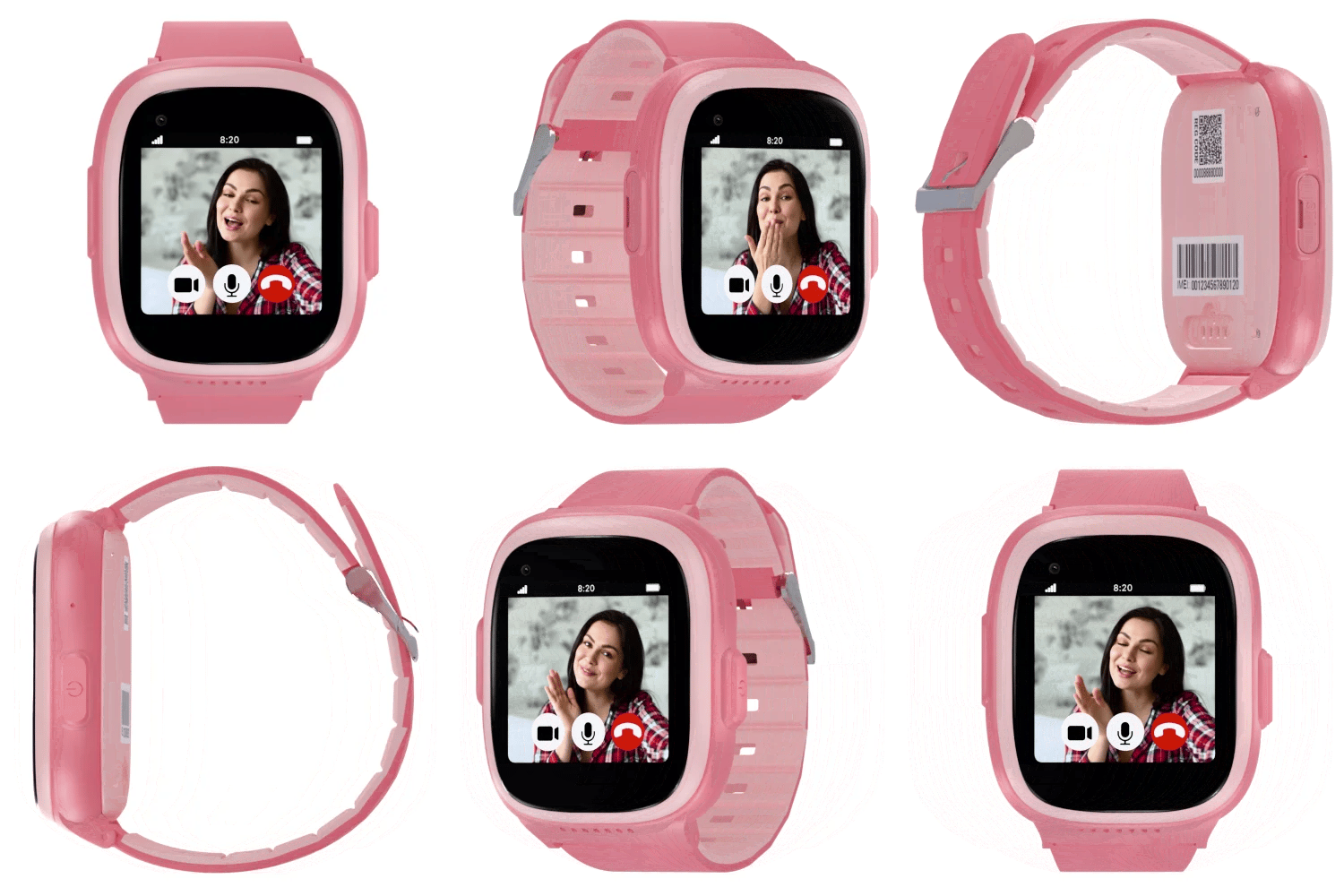


Fall Detection Smartwatch for Seniors
Limited-Time Sale

- Small and compact Design 1.22"W 2.16"H 0.58"D
- Two Way HD crystal clear calls
- Long lasting battery
- IP67 Water & Dust Resistance
- S9 SOS Fall Alert Smartwatch
- Magnetic USB Charging Cable
- Easy-to-follow User Guide
- Built-in fall detection
- SOS button with instant alerts
- Geofencing arrival & exit alerts
- Two-way voice calling
- Lifetime warranty
Just like a cellphone, the device needs an active SecuLife plan for Fall Detection, GPS tracking, alerts, calls/texts, app access, and premium features.
SecuLife currently ships within the United States using the following shipping methods:
- USPS 1st Class Mail (3–7 Business Days) — Free
- USPS Priority Mail (2–3 Business Days) — $9.50
- USPS Express Mail (1–2 Business Days) — $28.00
SecuLife has a 15-day return policy, which means you have 15 days after activating your service, to request a return.

USB Magnetic Charging Cable
Just like a mobile phone, your SecuLife safety wearable requires a cellular subscription plan to provide continuous 4G LTE connectivity, real-time GPS tracking, automatic fall detection, and 2-way emergency calling.
Pay upfront annually to lock in maximum monthly savings and enjoy uninterrupted 365-day active coverage and priority family caregiver mobile app access.
* Plan activation is completed easily after you receive your device. Free activation fee and free shipping are included with this promotion.
Senior Fall Detection Smartwatch with SOS Emergency Button
Help protect your loved ones. The Safety Smartwatch features automatic fall detection and SOS emergency alerts via SMS text messages with GPS location details, plus automatic dialing of emergency contacts, the smartwatch helps provide fast access to assistance when needed.
Automatic Fall Detection & Emergency Alerts
SecuLife helps detect potential falls and notify emergency contacts, providing added safety and peace of mind.
- 1Built-in motion sensors monitor movement patterns to identify potential falls while the device is being worn.
- 2When a potential fall is detected, the device can automatically send SMS alerts with location details and call designated emergency contacts.
- 3Caregivers can receive notifications through the SecuPro mobile app, check GPS location, and respond when assistance is needed.
- 4Important: If a fall occurs, press and hold the SOS button to help ensure emergency contacts are notified. Fall sensitivity is adjustable from levels 1–8 (recommended setting: 4). Automatic detection may miss some falls or trigger false alerts.

One-Touch SOS Emergency Button
Help is just one button press away whenever assistance is needed.
- 1The SecuLife SOS emergency button allows seniors to quickly initiate an alert when they need assistance.
- 2Pressing the SOS button activates the device's configured emergency communication process, helping connect the wearer with approved emergency contacts.
- 3Caregivers can receive notifications and respond according to the device's configured settings.
- 4The easy-to-access SOS button provides an additional way to request help without needing a separate smartphone.

Real-Time GPS Location & History Playback
Check current location and review previous movements directly from the mobile app.
- 1SecuLife GPS tracking allows approved caregivers to view the device's reported location directly through the SecuPro mobile app.
- 2Caregivers can access available location updates and review historical movement data to better understand where their loved one has traveled.
- 3History playback displays previously recorded locations and routes, allowing caregivers to review movement activity over a selected period.
- 4Location reporting frequency depends on the selected tracking settings, network connectivity, and device operating conditions.

Two-Way Voice Calling
Stay connected through convenient two-way voice communication anytime.
- 1SecuLife's built-in calling functionality helps seniors communicate with approved family members and caregivers directly through their wearable device.
- 2The device's integrated microphone and speaker support voice conversations without requiring the wearer to carry a separate smartphone.
- 3Approved contacts can communicate with the wearer according to the device's calling settings and supported capabilities.

GPS Geofencing & Safe Zone Alerts
Create safe zones and receive notifications when your loved one enters or leaves designated areas.
- 1SecuLife's geofencing feature allows caregivers to establish virtual boundaries around important locations, such as home, a family member's residence, or a frequently visited destination.
- 2Using the SecuPro mobile app, caregivers can create a safe zone, select the location, and adjust its radius.
- 3When the device detects entry into or departure from the designated area, a notification can be sent to approved caregivers.
- 4Important: Geofence boundaries can be configured with a minimum radius of approximately 100 feet. GPS accuracy may vary due to buildings, indoor conditions, signal limitations, and vehicle movement.

SecuPro Caregiver Mobile App
Manage essential safety features and stay connected from one convenient app.
- 1The SecuPro mobile app helps authorized family members and caregivers manage compatible SecuLife safety devices.
- 2Through the app, caregivers can access GPS location information, review available location history, configure safe zones, receive supported safety notifications, and manage approved contacts.
- 3Multiple authorized family members can be connected to help coordinate monitoring and communication.
- 4The SecuPro app is available for compatible iOS and Android smartphones.


Automatic Fall Detection & Emergency Alerts
SecuLife helps detect potential falls and notify emergency contacts, providing added safety and peace of mind.
- 1Built-in motion sensors monitor movement patterns to identify potential falls while the device is being worn.
- 2When a potential fall is detected, the device can automatically send SMS alerts with location details and call designated emergency contacts.
- 3Caregivers can receive notifications through the SecuPro mobile app, check GPS location, and respond when assistance is needed.
- 4Important: If a fall occurs, press and hold the SOS button to help ensure emergency contacts are notified. Fall sensitivity is adjustable from levels 1–8 (recommended setting: 4). Automatic detection may miss some falls or trigger false alerts.
One-Touch SOS Emergency Button
Help is just one button press away whenever assistance is needed.
- 1The SecuLife SOS emergency button allows seniors to quickly initiate an alert when they need assistance.
- 2Pressing the SOS button activates the device's configured emergency communication process, helping connect the wearer with approved emergency contacts.
- 3Caregivers can receive notifications and respond according to the device's configured settings.
- 4The easy-to-access SOS button provides an additional way to request help without needing a separate smartphone.
Real-Time GPS Location & History Playback
Check current location and review previous movements directly from the mobile app.
- 1SecuLife GPS tracking allows approved caregivers to view the device's reported location directly through the SecuPro mobile app.
- 2Caregivers can access available location updates and review historical movement data to better understand where their loved one has traveled.
- 3History playback displays previously recorded locations and routes, allowing caregivers to review movement activity over a selected period.
- 4Location reporting frequency depends on the selected tracking settings, network connectivity, and device operating conditions.
Two-Way Voice Calling
Stay connected through convenient two-way voice communication anytime.
- 1SecuLife's built-in calling functionality helps seniors communicate with approved family members and caregivers directly through their wearable device.
- 2The device's integrated microphone and speaker support voice conversations without requiring the wearer to carry a separate smartphone.
- 3Approved contacts can communicate with the wearer according to the device's calling settings and supported capabilities.
GPS Geofencing & Safe Zone Alerts
Create safe zones and receive notifications when your loved one enters or leaves designated areas.
- 1SecuLife's geofencing feature allows caregivers to establish virtual boundaries around important locations, such as home, a family member's residence, or a frequently visited destination.
- 2Using the SecuPro mobile app, caregivers can create a safe zone, select the location, and adjust its radius.
- 3When the device detects entry into or departure from the designated area, a notification can be sent to approved caregivers.
- 4Important: Geofence boundaries can be configured with a minimum radius of approximately 100 feet. GPS accuracy may vary due to buildings, indoor conditions, signal limitations, and vehicle movement.
SecuPro Caregiver Mobile App
Manage essential safety features and stay connected from one convenient app.
- 1The SecuPro mobile app helps authorized family members and caregivers manage compatible SecuLife safety devices.
- 2Through the app, caregivers can access GPS location information, review available location history, configure safe zones, receive supported safety notifications, and manage approved contacts.
- 3Multiple authorized family members can be connected to help coordinate monitoring and communication.
- 4The SecuPro app is available for compatible iOS and Android smartphones.
See What SecuLife Can Do
Real Reviews from Amazon Customers
Life saving
"I recently purchased the Seculife Smartwatch for my father-in-law, and it has been a lifesaver for our family. He often gets disoriented and lost during his daily walks around the neighborhood, but this watch has given us a reliable way to find his exact location and bring him home safely. The GPS tracking and geofencing features are incredibly accurate, providing immense peace of mind while allowing him to maintain some independence. It is a truly essential and user-friendly tool for anyone caring for a loved one with dementia."

Great for elders
"Got for my Grandpa. Calling sos works great. Had my 12 year old fall off the couch to see if fall detection work and it did! Recommend for anyone who has a loved one who falls. Grandpa wouldn't use life alert because he don't want emergency personal there. It directly calls me!"

Perfect for the elderly parent
"We got this for my mom who is in her 90's and has diabetes as well. She can use it and it allows us to find her and get notified by her throughout the week."

SOS watch for seniors
"This is such a great watch. I was impressed on how loud the water is. I charged it up and read the instructions and easily paired it to my moms phone. It has a gps and can notify myself and other in the event she falls. This offers me some peace of mind while at work and she is home."

Smart Idea
"Smart Idea and very similar to some of the other systems out there. I like the gps function though and It would be great for the elderly who suffer from alzheimers or dementia and tend to wander. It would definitely relieve some of the fear of a loved one getting lost. The service is not horribly expensive and definitely worth it for piece of mind... this is a wonderful piece of mind device that WILL save lives."

Easy to use and gives peace of mind
"Easy to use and set up. The app is also easy to use and makes it nice to see the location. I like the alerts that it gives when they enter and leave the house. Gives me peace of mind of how my Dad is doing and that he is safe."

Loving This
"I am so glad we purchased this. It gives me peace of mind. Very easy to use. We are very happy with our purchase."

Three Simple Steps to Senior
Safety & Peace of Mind
Get started with the SecuLife Fall Detection Smartwatch. Order your device today, activate your service when it arrives, and enjoy premium safety features with live customer onboarding support.
Order your smartwatch
Purchase the safety Smartwatch when your device arrives it's ready for you to activate.
Unbox & Get Connected
The Smartwatch has a pre-installed SIM card and magnetic charger.
Activate & Stay Protected
Activate your new Smartwatch online. Our live customer support team is here to assist you.
Have a Question? Search for Answers
Start typing below to explore answers about the SecuLife S9.
- Choosing a selection results in a full page refresh.
- Opens in a new window.